
Yes, an active telecom plan is required. The PetVora Collar cannot be used without a subscription. Your plan enables all essential features, including: Real-time GPS tracking & location history Virtual fencing setup Instant escape alerts to your phone Plans start at $9.99/month. For full details, visit: https://petvora.com/pages/petvora-collar-telecom-plan
PetVora Support
Contact Us
support@petvora.com
Frequently Asked Questions
The PetVora Collar focuses on creating GPS virtual fences over areas larger than 0.5 acres. Once your dog is trained to learn the feedback cues (tone, vibration, and static), the collar helps you manage fences and keep your dog safe while also monitoring your pet's health and activity. The PetVora Collar Air, on the other hand, is a more compact and beginner-friendly smart GPS tracking device that allows you to track your dog's real-time location and monitor health and activity data with ease. It has no minimum area requirement, making it convenient to use anywhere.
The PETVORA collar uses GPS petvora signals to determine your dog’s location, and GPS works best outdoors with a clear view of the sky. To ensure a stable experience, we recommend setting the virtual fence boundary at least about 50 feet away from your house. This buffer helps reduce the chance of boundary alerts when your dog is inside. If your home is closer to the boundary, using the Home Beacon feature is strongly recommended. Once placed indoors and set up in the app, the collar can recognize when your dog is within the Beacon range and automatically prevent GPS-based boundary alerts while indoors. When dogs are inside, GPS signals can be weakened, blocked, or reflected by roofs, walls, or metal structures, which may cause location drift. In some cases, this drift can make the system briefly think the dog is closer to or outside the boundary. It’s also worth noting that this is a common characteristic of all GPS-based pet collars on the market, not unique to PETVORA. For best results, we recommend using the virtual fence outdoors together with Home Beacon indoors to ensure accurate and reliable performance.
The virtual fence is created in the app as a boundary area. The collar continuously checks its position (GPS/GNSS), and when it detects the dog has crossed the fence boundary, it triggers a breach event. App alert: You receive a Breach Alert notification (as long as LTE/app syncing is working). On-collar feedback (optional): Depending on your settings, the collar can provide feedback such as whistle, vibration, or static. Ongoing alerts: If the dog remains outside, the system may continue sending alerts based on the product’s alert logic and your settings. Important note on accuracy: Fence performance is most reliable outdoors with a clear sky view. Small fence areas, heavy tree cover, tall buildings, or using it too close to the house can increase the risk of drift and false alerts.
Path: App - 'Me' - 'My Pet' option to enter the pet management page. Click 'Add Pet' at the top to add a pet. Note: Make sure your mobile Bluetooth is on and Collar is near you After adding a pet, you need to bind the Collar/device used by the pet with your mobile app via Bluetooth. A single pet can only be bound to one Collar/Tracker. If you have multiple collars, pls repeat the 'add pet' and Bluetooth pairing with the other Collars/ devices.
Trigger Conditions and Device Responses: When your dog is 16 feet away from the fence: The collar will give a one-time correction to your dog. A notification will be pushed to your mobile app. When your dog goes out of the fence: The collar will provide continuous corrections to your dog within a 328-foot range. A 'Breakthrough Alert' will be pushed once to your PETVORA mobile app. Escape beyond the range (> 328 feet): The collar will stop correcting your dog to avoid over-stimulation.
The collar is adjustable to fit necks ranging from 17 to 30 inches with the magnetic clasp attached, ideal for large dogs, or smaller breeds with thicker necks. It can be sized down to 14 inches by removing the magnetic clasp or by switching the Mag Strap for the Flex Strap, allowing it to fit some small to medium-sized dogs. For guidance on how to properly adjust the collar to the smallest size, please refer to our instructional video here: https://youtu.be/M9as0wfYlU8
For wooded areas, the trees will weaken both 4G and GPS signals for the collar, which may lead to occasional wrong alerts and corrections. In rural areas with spotty cell service, location updates and fence alerts might be delayed or less accurate, as the collar relies on a stable 4G connection to communicate with the app.While it may still function intermittently, we recommend using it in locations with stronger signal coverage for the best performance.
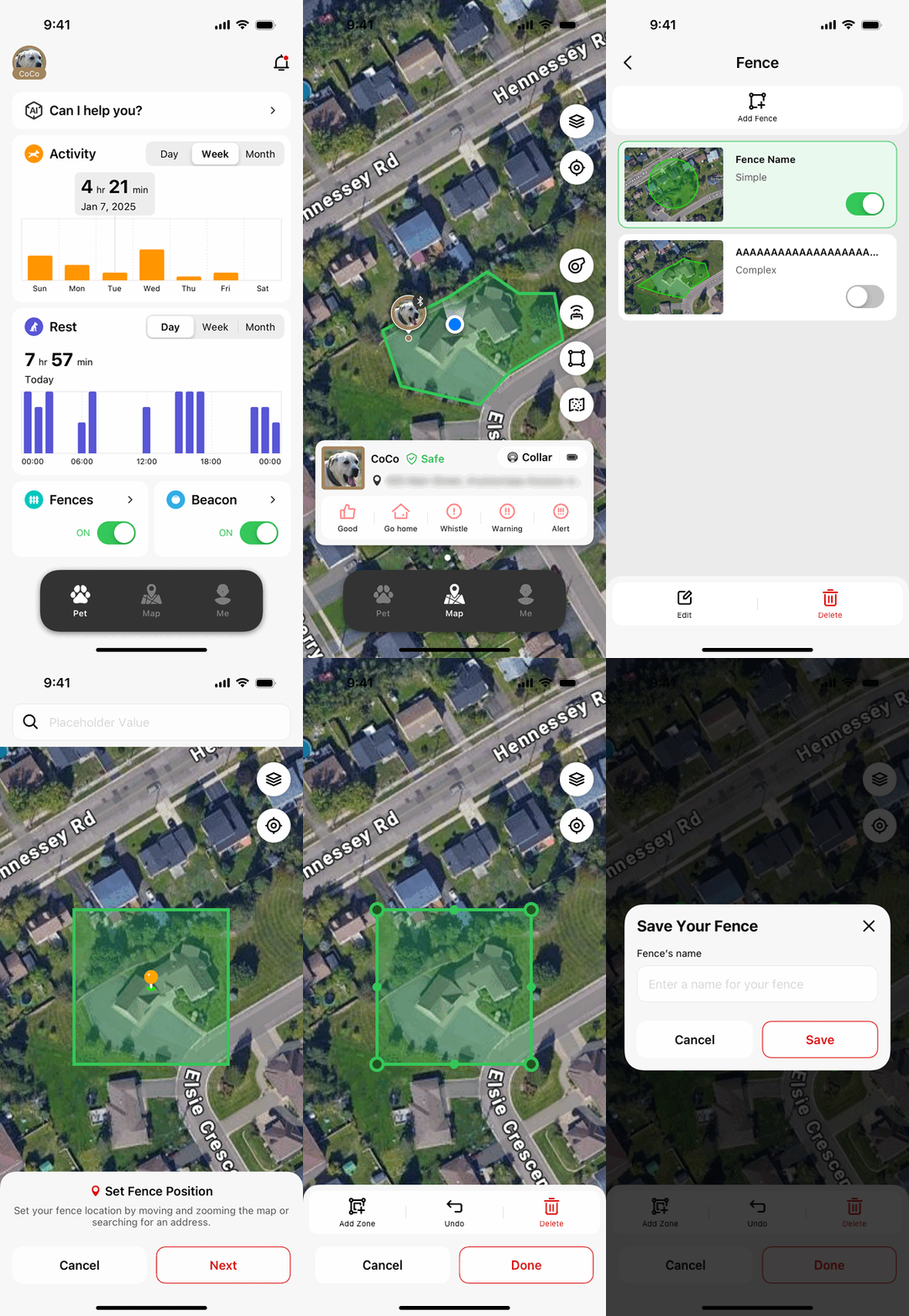
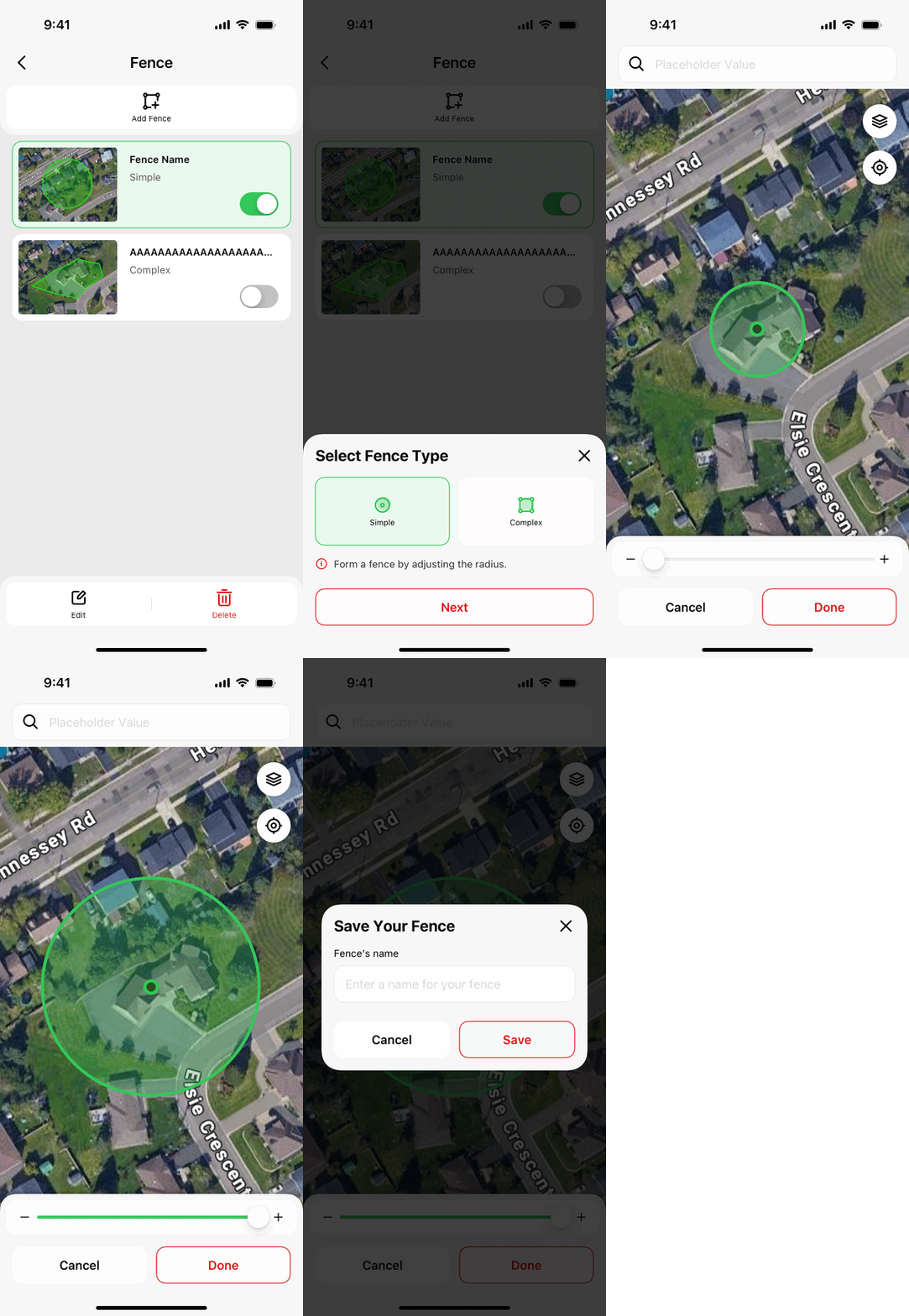
There are two ways to create a fence: Simple (circular) and Complex. Option 1: Open the app, go to Pet > Fence > Add Fence. Option 2: Open the app, go to Map > Tap the Fence Icon.
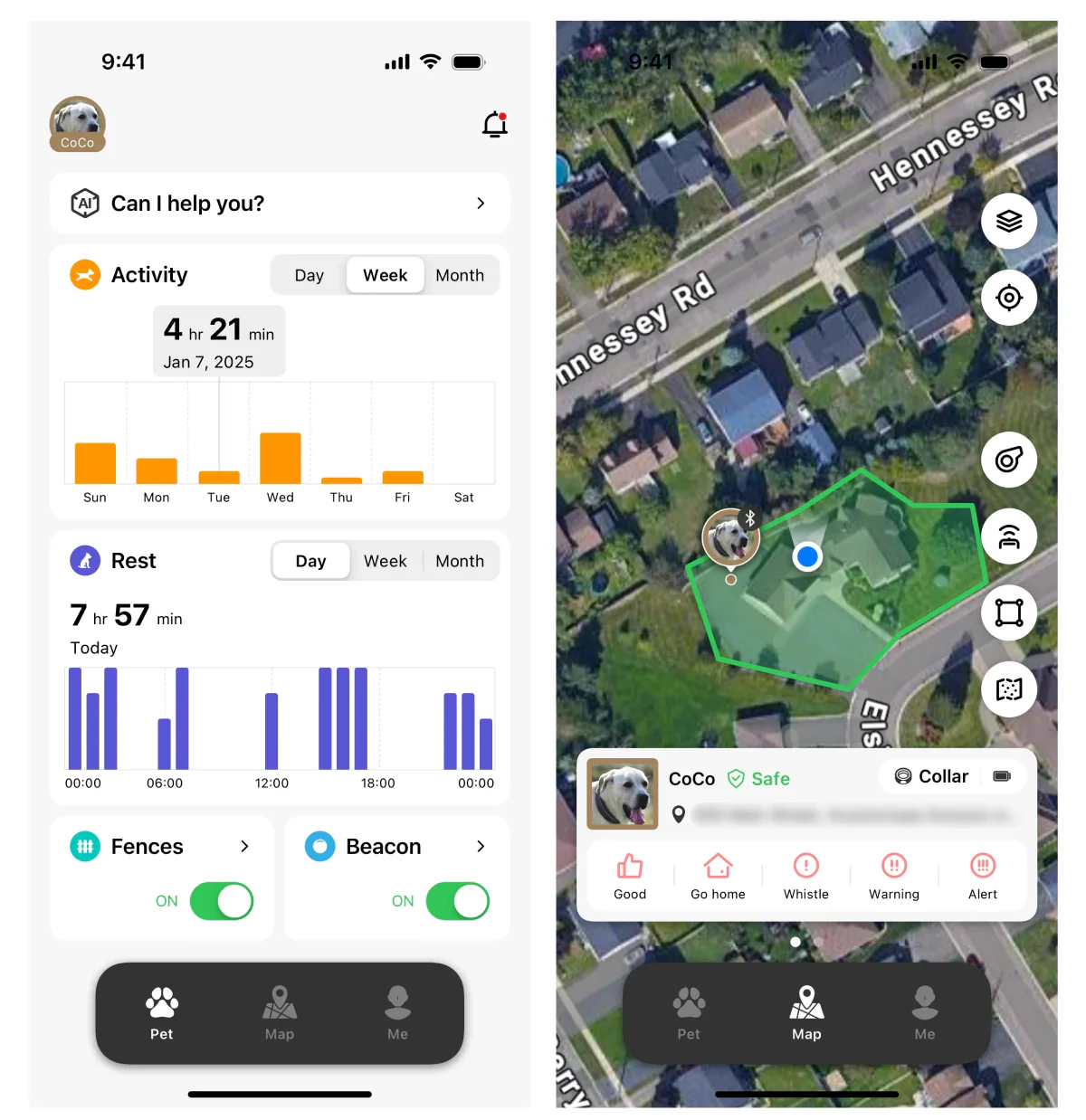
Create a Circular Fence: Adjust the fence size by pinching to zoom or using the slider below.You can also move the map to set the fence’s position. Once everything is set, tap the 'Done' button, enter a name for the fence in the pop- up window, and tap 'Save'. After successfully creating the fence, it will appear in your fence list.
Create a Complex Fence: Choose the location for the fence.You can adjust it by moving the map or entering a specific address above.Once the location is set, adjust the fence size by zooming in or out on the map or dragging the boundary points.To move a point, press and hold it until you feel a slight vibration, then drag it to the desired position.When everything is set, tap the 'Done' button, enter a name for the fence in the pop- up window, and tap 'Save'.After successfully creating the fence, it will appear in your fence list.
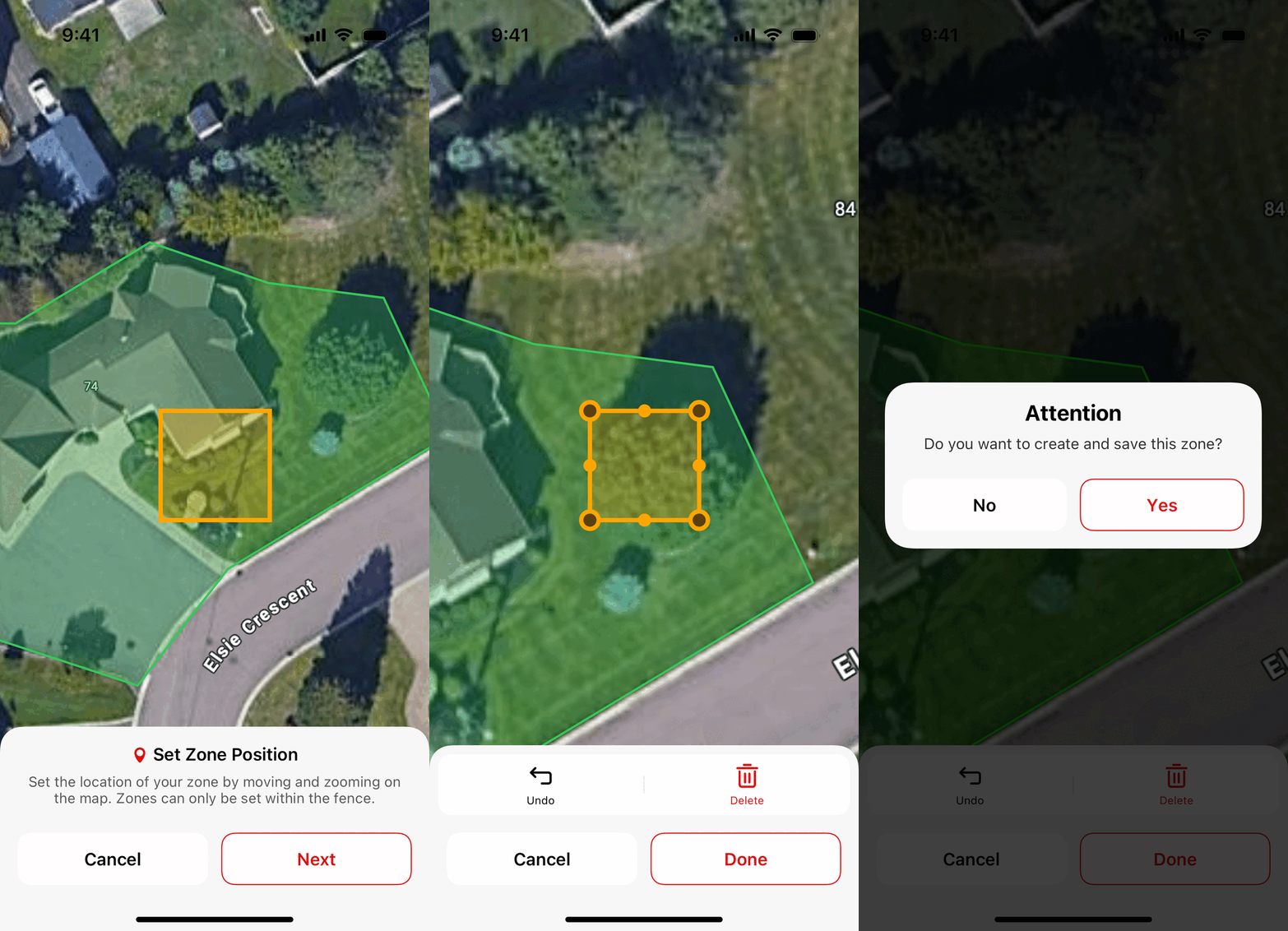
Creating a Dangerous Zone: Currently, you can only create one dangerous zone within a complex fence.This feature helps keep pets away from hazardous areas, such as swimming pools.Simple(circular) fences do not support the “dangerous zone” feature. Set the location of the dangerous zone within the boundaries of the complex fence. Adjust the size and shape of the dangerous zone as needed. Save your changes and return to the fence editing interface.
The collar uses advanced GPS technology for precise tracking, typically within 3-5 feet in open areas. However, accuracy can vary based on terrain, weather, and nearby obstructions like tall buildings or dense forests. World's First: Dual Antennas & Dual-Frequency - Ensures superior accuracy compared to single-frequency collars.5 Major Global Navigation PetVora Systems - Uses GPS, GLONASS, Galileo, BeiDou, and QZSS for maximum reliability. Coverage in 180 Countries - Works worldwide, making it ideal for travelers and remote locations.